
Introduction
As digital transformation continues to reshape industries, Android ID Scanner SDK has become a core requirement for businesses across banking, fintech, healthcare, insurance, telecommunications, gaming, travel, and government services. Users now expect to verify their identity within seconds using nothing more than their smartphones. This demand has led to the rapid adoption of Android ID Scanner SDKs that can accurately recognize identity documents, extract personal information, and streamline customer onboarding.
Whether you are building an eKYC platform, a digital banking application, a cryptocurrency exchange, a hotel check-in solution, or an employee verification system, integrating an Android ID Scanner SDK can significantly improve both user experience and operational efficiency.
MiniAI-IDSDK 1.1 is designed to simplify this process by providing developers with a powerful, AI-powered identity document recognition solution for Android. The SDK supports offline processing, high-speed OCR, automatic document detection, and recognition of passports, national identity cards, driver’s licenses, and many other official documents.
In this guide, you’ll learn why Android ID recognition is essential, explore the key capabilities of MiniAI-IDSDK 1.1, and walk through the integration process so you can quickly add secure, intelligent document scanning to your Android application.
What Is an Android ID Scanner SDK?
An Android ID Scanner SDK is a software development kit that enables Android applications to capture, detect, recognize, and process identity documents directly from a mobile device’s camera.
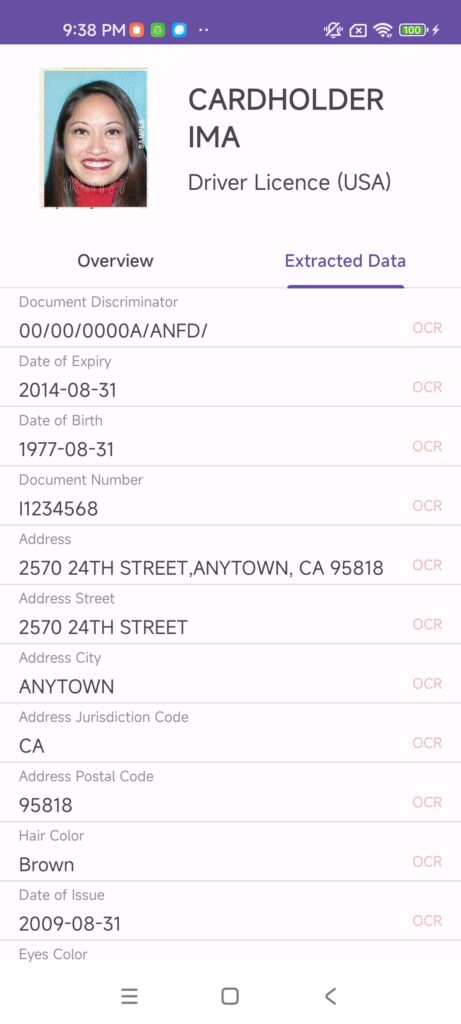
Instead of requiring users to manually enter personal information, the SDK automatically extracts data such as:
- Full name
- Date of birth
- Gender
- Nationality
- Passport number
- Driver’s license number
- ID card number
- Document expiration date
- Issuing country
- MRZ (Machine Readable Zone)
- Document images
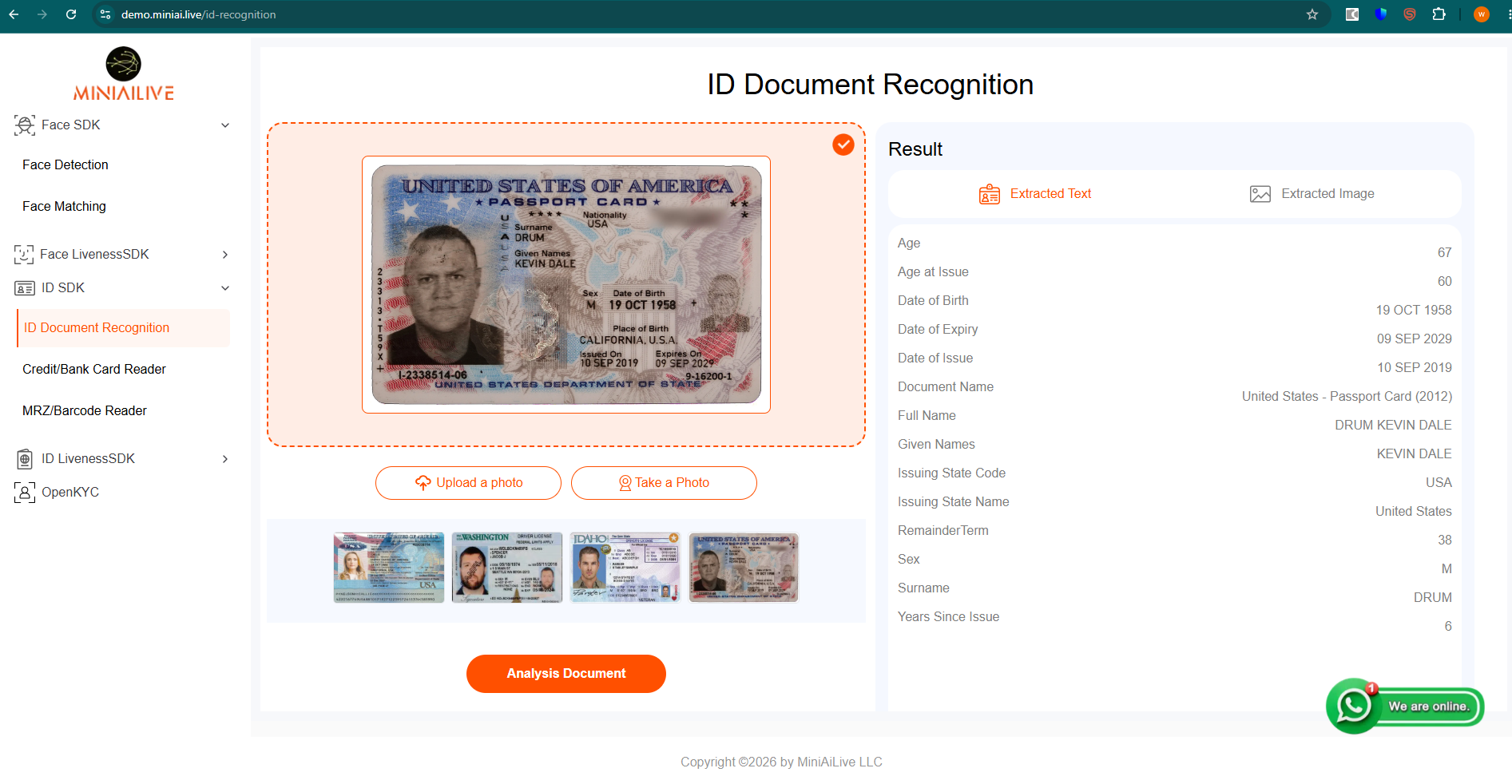
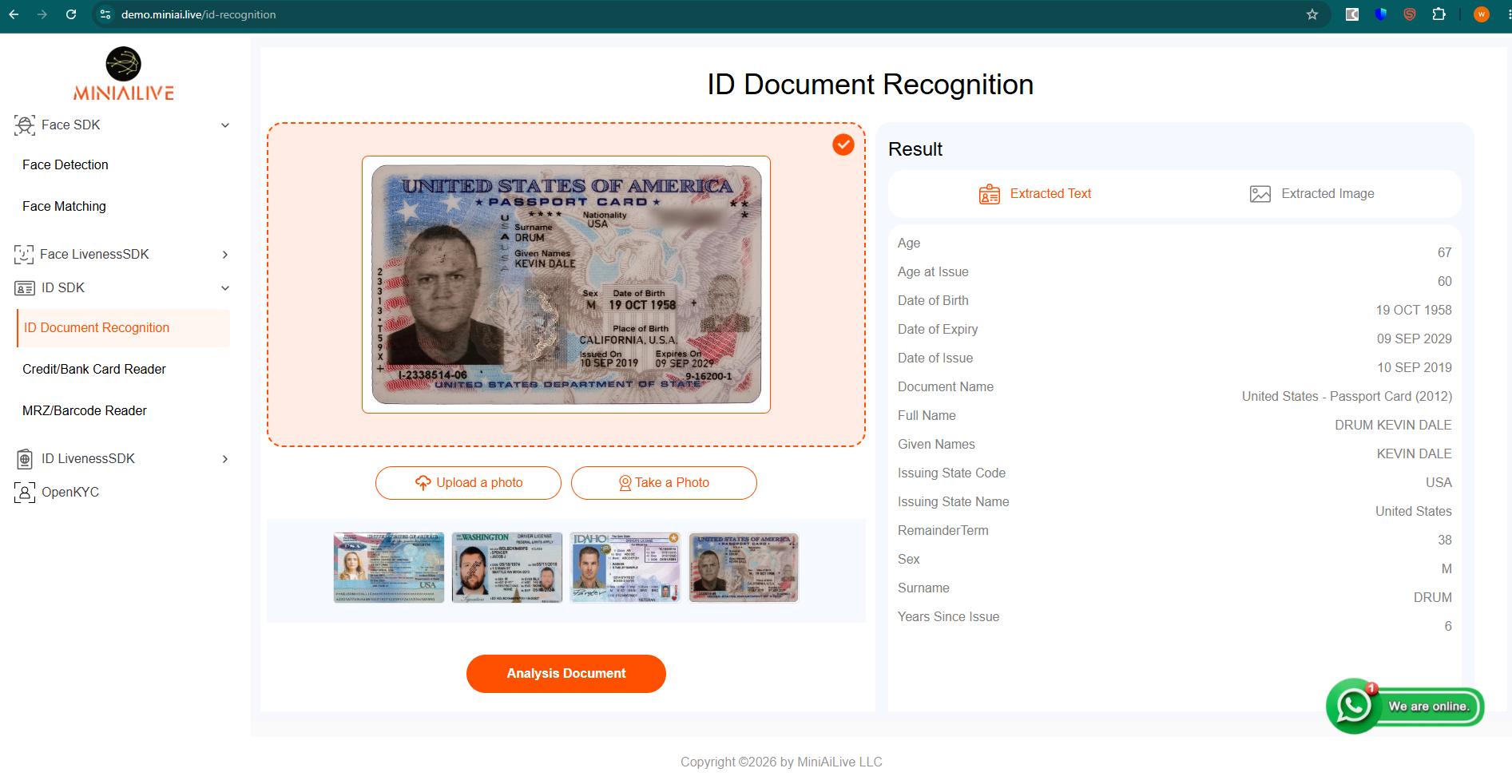
Below shows how MiniAI ID SDK Android version and server version works.
Modern SDKs also use artificial intelligence to locate document boundaries, correct image perspective, reduce glare, improve OCR accuracy, and validate document quality before extracting information.
As a result, users can complete identity verification in just a few seconds, reducing errors while improving the onboarding experience.
Why Mobile Apps Need an Android ID Scanner SDK
Faster Customer Onboarding
Traditional registration processes require users to manually enter information from identity documents. This approach is slow, frustrating, and prone to typing mistakes.
An Android ID Scanner SDK automatically extracts document information in seconds, dramatically reducing onboarding time.
Improved Data Accuracy
Manual data entry frequently introduces spelling errors, missing fields, and incorrect document numbers.
Automated OCR minimizes these issues by extracting information directly from the original document.
Better User Experience
Users appreciate a fast, intuitive verification process. Instead of typing dozens of fields, they simply point the camera at their ID and let the SDK handle the rest.
This reduces abandonment rates and improves customer satisfaction.
Enhanced Security
Modern AI-powered SDKs perform image quality assessment, document boundary detection, and validation before processing, helping prevent incomplete or poor-quality submissions.
Reduced Operational Costs
Automated document recognition minimizes manual review, allowing organizations to process more identity verifications with fewer resources.
Why Choose MiniAI-IDSDK 1.1?
MiniAI-IDSDK 1.1 contains latest ID cards, passports and Driver licenses from 200+ countries, we added lots of datasets and finally published IDSDK 1.1.
MiniAI-IDSDK 1.1 is built for developers who need fast, reliable, and secure identity document recognition on Android devices.
The SDK combines artificial intelligence, optical character recognition (OCR), and document analysis into a lightweight package that can be integrated into Android applications with minimal development effort.
Key benefits include:
- AI-powered document detection
- Automatic edge detection
- Intelligent perspective correction
- High-accuracy OCR
- Fast processing speed
- Offline document recognition
- Easy Android integration
- Clean API design
- Enterprise-grade security
- Support for a wide range of document types
Whether your application serves thousands or millions of users, MiniAI-IDSDK 1.1 is designed to deliver reliable performance and a smooth user experience.
Key Features of MiniAI-IDSDK 1.1
1. AI-Powered Document Detection
MiniAI-IDSDK automatically detects the location of an identity document within the camera preview.
Users do not need to manually crop or align the document. The SDK intelligently identifies the document boundaries and captures the optimal image.
2. High-Accuracy OCR
The built-in OCR engine extracts text from identity documents with high accuracy.
Supported fields include:
- Name
- Date of Birth
- Nationality
- Gender
- Document Number
- Expiration Date
- Address (where available)
- MRZ information
This significantly reduces manual data entry.
3. Offline Recognition
Unlike cloud-only solutions, MiniAI-IDSDK supports fully offline-on device document recognition.
Benefits include:
- Faster processing
- Improved privacy
- Reduced internet dependency
- Lower server costs
- Better performance in remote locations
Offline processing is particularly valuable for financial institutions, healthcare providers, and government agencies that require sensitive information to remain on the device or within controlled environments.
4. Multiple Document Types
MiniAI-IDSDK recognizes various identity documents, including:
- National ID cards
- Driver’s licenses
- Passports
- Residence permits
- Visa documents
- Other government-issued IDs
This flexibility allows developers to build applications for users from different regions and industries.
5. Automatic Image Enhancement
Poor lighting, shadows, reflections, and tilted camera angles can reduce OCR accuracy.
MiniAI-IDSDK automatically applies image enhancement techniques such as:
- Perspective correction
- Brightness adjustment
- Noise reduction
- Sharpness optimization
- Edge refinement
These improvements help ensure reliable recognition even under less-than-ideal conditions.
6. Fast Processing Speed
Speed plays a crucial role in mobile identity verification.
MiniAI-IDSDK is optimized to deliver results within seconds on modern Android devices, enabling a smooth onboarding experience while reducing user wait times.
Common Use Cases
MiniAI-IDSDK can be integrated into many different industries.
Digital Banking
Banks can automate customer onboarding by scanning identity documents during account creation.
Fintech
Payment providers and digital wallet applications can perform identity verification before activating user accounts.
Cryptocurrency Exchanges
Crypto platforms can support Know Your Customer (KYC) requirements by capturing and extracting information from government-issued IDs.
Healthcare
Hospitals and clinics can streamline patient registration by automatically scanning identity documents instead of relying on manual data entry.
Travel and Hospitality
Hotels, airlines, and travel agencies can speed up check-in by scanning passports or national ID cards.
Government Services
Public agencies can digitize identity verification for online citizen services and reduce paperwork.
Benefits for Developers
MiniAI-IDSDK is designed to help developers integrate document recognition with minimal effort.
Key advantages include:
- Simple Android APIs
- Clean SDK architecture
- Easy integration
- Fast deployment
- Reliable performance
- Flexible configuration
- Reduced development time
- Lower maintenance costs
Whether you’re creating a new Android application or adding identity verification to an existing product, the SDK helps accelerate development while maintaining a high standard of accuracy and security.
Getting Started with Integration
Integrating MiniAI-IDSDK 1.1 into your Android project is straightforward. In the next section of this guide, you’ll learn how to:
- Add the SDK to your Android project
- Configure Gradle dependencies
- Request camera permissions
- Initialize the SDK
- Launch the document scanner
- Capture ID images
- Extract OCR results
- Handle recognition callbacks
- Display extracted information within your application
These steps will help you quickly implement secure, AI-powered identity document recognition and deliver a seamless verification experience to your users.
Here is how you can integrate our SDK.
1. Replace your license file to \app\src\main\res\raw\license.mis
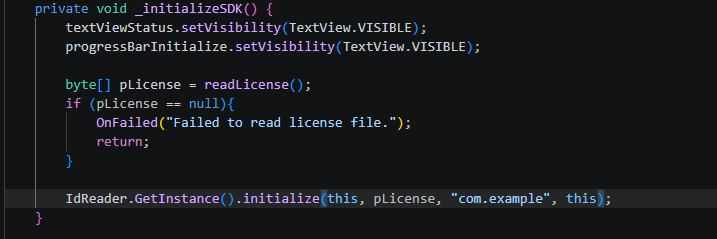
2. Open \app\src\main\java\com\miniai\idreader\SplashActivity.java
in the 40 line, you must add your application ID.
IdReader.GetInstance().initialize(this, pLicense,”com.example” this);
You need to replace application ID here.
3. Build project
Conclusion
As mobile applications continue to replace traditional in-person identity verification, integrating a reliable Android ID Scanner SDK has become an essential feature for organizations that prioritize security, efficiency, and a seamless user experience. From digital banking and fintech to healthcare, travel, gaming, telecommunications, and government services, accurate identity document recognition helps accelerate customer onboarding while reducing manual effort and minimizing data entry errors.
MiniAI-IDSDK 1.1 provides developers with a comprehensive solution for adding AI-powered ID document recognition to Android applications. With support for automatic document detection, high-accuracy OCR, offline processing, image enhancement, and recognition of passports, national ID cards, driver’s licenses, and other government-issued documents, the SDK enables businesses to build secure and scalable identity verification workflows with ease.
Its developer-friendly APIs, optimized performance, and flexible deployment options make integration straightforward, whether you are creating a new Android application or enhancing an existing mobile platform. By processing identity documents quickly and accurately, organizations can improve operational efficiency, strengthen compliance with KYC and identity verification requirements, and deliver a better experience for end users.
If you’re looking for a dependable Android ID Scanner SDK that combines speed, accuracy, security, and ease of integration, MiniAI-IDSDK 1.1 is an excellent choice. Start integrating the SDK into your Android application today and provide your users with a fast, intelligent, and reliable identity verification experience.
Next Steps
Ready to integrate AI-powered ID document recognition into your Android application?
Explore the MiniAI-IDSDK 1.1 documentation, download the SDK, and begin building secure mobile identity verification solutions that scale with your business. Whether your application serves hundreds or millions of users, MiniAI-IDSDK is designed to help you deliver accurate, efficient, and user-friendly document scanning on Android devices.